Document Service API: Middlewares
Page summary:Document Service middlewares allow you to perform actions before and after Document Service methods run by registering middleware functions via
strapi.documents.use()with access to content type context and method parameters.
The Document Service API offers the ability to extend its behavior thanks to middlewares.
Document Service middlewares allow you to perform actions before and/or after a method runs.
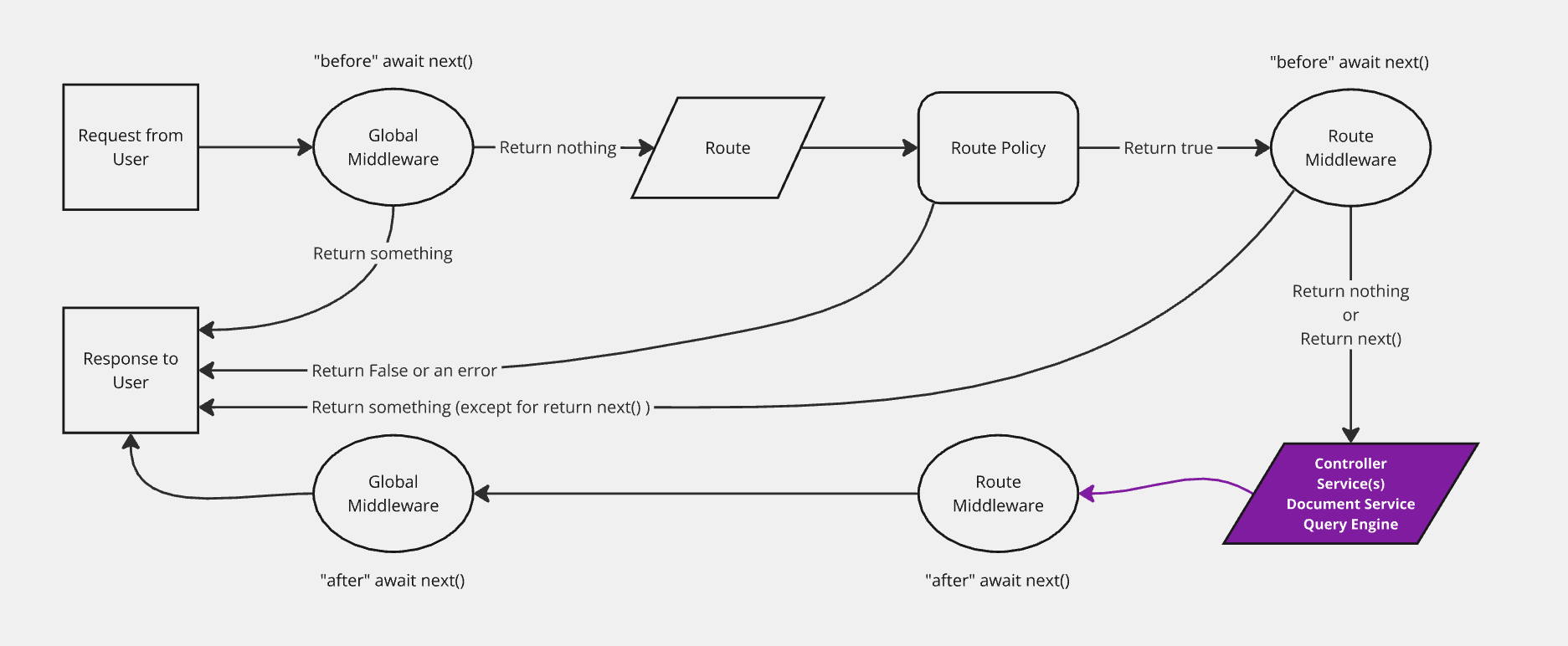
Registering a middleware
Syntax: strapi.documents.use(middleware)
Parameters
A middleware is a function that receives a context and a next function.
Syntax: (context, next) => ReturnType<typeof next>
| Parameter | Description | Type |
|---|---|---|
context | Middleware context | Context |
next | Call the next middleware in the stack | function |
context
| Parameter | Description | Type |
|---|---|---|
action | The method that is running (see available methods) | string |
params | The method params (see available methods) | Object |
uid | Content type unique identifier | string |
contentType | Content type | ContentType |
Examples:
The following examples show what context might include depending on the method called:
- findOne
- findMany
- create
- update
- delete
{
  uid: "api::restaurant.restaurant",
  contentType: {
    kind: "collectionType",
    collectionName: "restaurants",
    info: {
      singularName: "restaurant",
      pluralName: "restaurants",
      displayName: "restaurant"
    },
    options: {
      draftAndPublish: true
    },
    pluginOptions: {},
    attributes: {
      name: { /*...*/ },
      description: { /*...*/ },
      createdAt: { /*...*/ },
      updatedAt: { /*...*/ },
      publishedAt: { /*...*/ },
      createdBy: { /*...*/ },
      updatedBy: { /*...*/ },
      locale: { /*...*/ },
    },
    apiName: "restaurant",
    globalId: "Restaurants",
    uid: "api::restaurant.restaurant",
    modelType: "contentType",
    modelName: "restaurant",
    actions: { /*...*/ },
    lifecycles: { /*...*/ },
  },
  action: "findOne",
  params: {
    documentId: 'hp7hjvrbt8rcgkmabntu0aoq',
    locale: undefined,
    status: "publish"
    populate: { /*...*/ },
  }
}
{
  uid: "api::restaurant.restaurant",
  contentType: {
    kind: "collectionType",
    collectionName: "restaurants",
    info: {
      singularName: "restaurant",
      pluralName: "restaurants",
      displayName: "restaurant"
    },
    options: {
      draftAndPublish: true
    },
    pluginOptions: {},
    attributes: {
      name: { /*...*/ },
      description: { /*...*/ },
      createdAt: { /*...*/ },
      updatedAt: { /*...*/ },
      publishedAt: { /*...*/ },
      createdBy: { /*...*/ },
      updatedBy: { /*...*/ },
      locale: { /*...*/ },
    },
    apiName: "restaurant",
    globalId: "Restaurants",
    uid: "api::restaurant.restaurant",
    modelType: "contentType",
    modelName: "restaurant",
    actions: { /*...*/ },
    lifecycles: { /*...*/ },
  },
  action: "findMany",
  params: {
    filters: { /*...*/ },
    status: "draft",
    locale: null,
    fields: ['name', 'description'],
  }
}
{
  uid: "api::restaurant.restaurant",
  contentType: {
    kind: "collectionType",
    collectionName: "restaurants",
    info: {
      singularName: "restaurant",
      pluralName: "restaurants",
      displayName: "restaurant"
    },
    options: {
      draftAndPublish: true
    },
    pluginOptions: {},
    attributes: {
      name: { /*...*/ },
      description: { /*...*/ },
      createdAt: { /*...*/ },
      updatedAt: { /*...*/ },
      publishedAt: { /*...*/ },
      createdBy: { /*...*/ },
      updatedBy: { /*...*/ },
      locale: { /*...*/ },
    },
    apiName: "restaurant",
    globalId: "Restaurants",
    uid: "api::restaurant.restaurant",
    modelType: "contentType",
    modelName: "restaurant",
    actions: { /*...*/ },
    lifecycles: { /*...*/ },
  },
  action: "create",
  params: {
    data: { /*...*/ },
    status: "draft",
    populate: { /*...*/ },
  }
}
{
  uid: "api::restaurant.restaurant",
  contentType: {
    kind: "collectionType",
    collectionName: "restaurants",
    info: {
      singularName: "restaurant",
      pluralName: "restaurants",
      displayName: "restaurant"
    },
    options: {
      draftAndPublish: true
    },
    pluginOptions: {},
    attributes: {
      name: { /*...*/ },
      description: { /*...*/ },
      createdAt: { /*...*/ },
      updatedAt: { /*...*/ },
      publishedAt: { /*...*/ },
      createdBy: { /*...*/ },
      updatedBy: { /*...*/ },
      locale: { /*...*/ },
    },
    apiName: "restaurant",
    globalId: "Restaurants",
    uid: "api::restaurant.restaurant",
    modelType: "contentType",
    modelName: "restaurant",
    actions: { /*...*/ },
    lifecycles: { /*...*/ },
  },
  action: "update",
  params: {
    data: { /*...*/ },
    documentId: 'hp7hjvrbt8rcgkmabntu0aoq',
    locale: undefined,
    status: "draft"
    populate: { /*...*/ },
  }
}
{
  uid: "api::restaurant.restaurant",
  contentType: {
    kind: "collectionType",
    collectionName: "restaurants",
    info: {
      singularName: "restaurant",
      pluralName: "restaurants",
      displayName: "restaurant"
    },
    options: {
      draftAndPublish: true
    },
    pluginOptions: {},
    attributes: {
      name: { /*...*/ },
      description: { /*...*/ },
      createdAt: { /*...*/ },
      updatedAt: { /*...*/ },
      publishedAt: { /*...*/ },
      createdBy: { /*...*/ },
      updatedBy: { /*...*/ },
      locale: { /*...*/ },
    },
    apiName: "restaurant",
    globalId: "Restaurants",
    uid: "api::restaurant.restaurant",
    modelType: "contentType",
    modelName: "restaurant",
    actions: { /*...*/ },
    lifecycles: { /*...*/ },
  },
  action: "delete",
  params: {
    data: { /*...*/ },
    documentId: 'hp7hjvrbt8rcgkmabntu0aoq',
    locale: "*",
    populate: { /*...*/ },
  }
}
next
next is a function without parameters that calls the next middleware in the stack and return its response.
Example
strapi.documents.use((context, next) => {
  return next();
});
Where to register
Generaly speaking you should register your middlewares during the Strapi registration phase.
Users
The middleware must be registered in the general register() lifecycle method:
module.exports = {
  register({ strapi }) {
    strapi.documents.use((context, next) => {
      // your logic
      return next();
    });
  },

  // bootstrap({ strapi }) {},
  // destroy({ strapi }) {},
};
Plugin developers
The middleware must be registered in the plugin's register() lifecycle method:
module.exports = {
  register({ strapi }) {
    strapi.documents.use((context, next) => {
      // your logic
      return next();
    });
  },

  // bootstrap({ strapi }) {},
  // destroy({ strapi }) {},
};
Implementing a middleware
When implementing a middleware, always return the response from next().
Failing to do this will break the Strapi application.
Examples
const applyTo = ['api::article.article'];

strapi.documents.use((context, next) => {
  // Only run for certain content types
  if (!applyTo.includes(context.uid)) {
    return next();
  }

  // Only run for certain actions
  if (['create', 'update'].includes(context.action)) {
    context.params.data.fullName = `${context.params.data.firstName} ${context.params.data.lastName}`;
  }

  const result = await next();

  // do something with the result before returning it
  return result
});
The Document Service API triggers various database lifecycle hooks based on which method is called. For a complete reference, see Document Service API: Lifecycle hooks.